Companies considering e-paper labels rarely ask first about label prices. They ask: "We already have our own systems — do we have to replace them?" No. This article covers the integration approach we use in partnership with Advantech: Advantech handles the hardware and label management, and Jackman connects the e-paper to your existing systems.
First, the three tiers of an e-paper system
- Back-end management platform: manages label content, schedules and data integration centrally, deployable in the cloud or on-premises. Advantech's platform is DeviceOn/ePaper.
- Gateways: receive commands from the platform and forward them wirelessly to labels.
- E-paper labels: receive and display content, use little power and can be deployed in large numbers.
The tiers are two-way: label battery and connection status flow back to the platform for monitoring and alerts. So the labels aren't the hard part — the real work is where the data comes from, i.e. how it connects to your existing systems.
Our approach: plug e-paper into your existing MIS
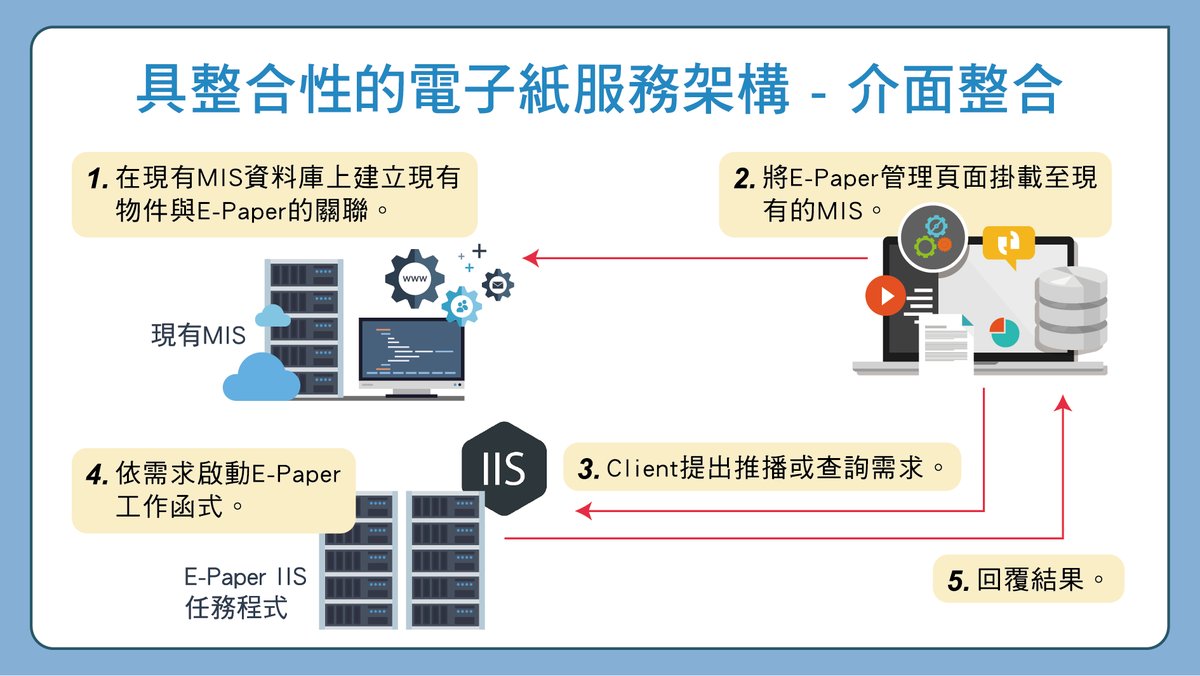
The core idea: users don't have to learn another system. The flow has five steps:
- In the existing MIS database, link "items" to "e-paper labels". For example, which product, storage location or material cart maps to which label.
- Mount the e-paper management page inside the existing MIS. Users manage labels from the system they already know.
- A user (or the system) requests a push or a query.
- A separate e-paper task service, running on IIS, carries out the request — generating content and pushing it to the labels.
- The result is returned to the MIS, so users know whether the update succeeded.
Keeping e-paper work in a separate task service has two benefits: the existing MIS needs almost no changes to its core logic, and swapping hardware or adjusting label layouts on the e-paper side doesn't affect the original system.
How data syncs automatically
Beyond manual pushes, the more common need is "when the data changes, the label changes." This is done with an integration layer between the source system and the label platform:
- Source system: POS, ERP, inventory management or MIS.
- Integration layer: receives data-change events via API or message queue.
- Label management platform: converts the data and generates label update tasks.
- Sync: updates are pushed through the gateways and label content updates automatically.
Typical triggers include price changes, promotions going live or ending, stock status changes and chain-wide adjustments across stores. The interface depends on the existing system: API, database sync or file import.
Choosing hardware: wireless e-paper or battery-free NFC
| Wireless e-paper (with gateways) | Battery-free NFC e-paper | |
|---|---|---|
| How it updates | Platform pushes in batches or in real time via gateways | Tap with a phone or NFC reader to update |
| Power | Battery, very low consumption | No battery — powered by the NFC field |
| Best for | Large numbers of labels needing central remote updates | Factory and logistics labels that staff pass by anyway |
Taking Advantech's NFC e-paper as an example, the EPD-302/303/304 are 3.7-inch, 240 × 416 resolution, in black/white, black/white/red and black/white/red/yellow, using ISO/IEC 15693 NFC with an IP68 rating, and the vendor provides sample code to ease integration. Which type fits depends on your site and how often content changes.
Not just retail pricing
The same integration architecture extends to other settings (label sizes in brackets are from Advantech's industry bundles):
- Factories: in-house logistics labels (2.9") and production material cart labels (5.6").
- Offices: meeting-room status and booking information (5.6").
- Healthcare: bedside cards synced with medical records, reducing manual transcription errors (13.3").
- Warehousing: picking and storage-location labels kept in sync with the system.
Recommended rollout
- Assessment: site survey; review existing systems, data formats and interfaces.
- Small pilot: install a few labels to validate wireless communication and the update flow.
- System integration: connect existing systems and complete data mapping and automatic sync.
- Full rollout: expand deployment and train staff.
- Operations support: monitor label status and alerts, with ongoing maintenance.
If you're evaluating e-paper: before comparing label prices, work out which system the label data comes from and how often it changes. Those two answers decide the integration approach and the hardware — and whether the rollout actually saves work, or just adds another system someone has to maintain by hand.
See our E-Paper Integration page for more. If you'd like to evaluate whether e-paper can connect to your current systems, let's talk — we recommend starting with a small pilot.